
Workflows & Self-Service
Workflow Compliance
What is the Compliance Center?
The Compliance Center helps you ensure your CI/CD workflows follow your organization's best practices and compliance requirements. Using AI-powered analysis, it automatically evaluates your workflows against configurable rules and provides detailed reports with actionable recommendations.
Key Benefits
- Automated Compliance Checking: Instantly evaluate workflows against your organization's standards
- Multi-Level Visibility: Monitor compliance across your entire organization, individual projects, repositories, and workflows
- Real-Time Monitoring: Track evaluation progress with automatic updates
- Actionable Insights: Get specific recommendations for improving compliance
- Prioritized Issues: Focus on critical issues first with importance-based categorization
Getting Started
Accessing the Compliance Center
Select Compliance from your organization navigation. The Compliance Center has five tabs:
- Overview — posture first: score, band, trend, and distribution, then exposure tiles, failing rules beside repositories that need attention, and a coverage footnote
- Projects — scores rolled up by project
- Repositories — scores and history for each repository
- Workflows — workflows you can evaluate or remediate
- Rules — your organization's guardrail catalog, including custom rules
On Overview, select a failing rule to open the Workflows tab filtered to that rule.
Understanding Compliance Levels
At the project and repository level, this same capability appears as Guardrails. A project's Guardrails view mirrors the organization layout with Overview, Repositories, and Workflows, scoped to that project's repositories. Project viewers can open it without organization-wide access.
You can view compliance at three levels:
- Organization (
/orgs/{orgId}/compliance) — posture across the repositories you can access - Project (
/projects/{projectId}/guardrails) — the same overview for one project - Repository (
/repos/{repoId}/guardrails) — workflows in a single repository
Compliance Guardrails and Categories
Compliance Guardrails are individual rules that are used to evaluate whether or not a given GitHub Actions Workflow is compliance with organizational standards. These rules are generally evaluated based on the source code of the workflow, but can also include other information including dependabot configurations. Here is an example rule:
Every GitHub Actions Workflow must explicitly define minimum required permissions for GITHUB_TOKEN at the workflow job level. Default permissions or "write-all" violate least privilege principle.
Individual GitHub Actions Workflows can be scored against a centralized list of these rules to determine their compliance score. This is useful information that serves two purposes:
- Developers - see which rules a workflow failed so they can implement fixes
- Administrators - see aggregated compliance scores to gain a strategic view of the organization's automations
How Guardrails Work
Compliance rules are organized into categories that apply to different types of workflow files. Each rule:
- Has a clear description of the requirement
- Includes an importance level (Critical, High, Medium, or Low)
- Is evaluated automatically by AI
- Provides specific feedback when workflows don't comply
Rule Importance Levels
Rules are prioritized to help you focus on what matters most:
| Level | Badge Color | Description | Example |
|---|---|---|---|
| Critical | Red | Security-critical issues requiring immediate action | "All workflows must include secret scanning" |
| High | Orange | Important best practices that should be addressed soon | "Production deployments require approval gates" |
| Medium | Yellow | Recommended practices for improved quality | "Workflows should use dependency caching" |
| Low | Blue | Nice-to-have improvements | "Add descriptive comments to complex steps" |
Rule Evaluation Types
Compliance rules are evaluated using two different approaches:
| Type | Description | Example |
|---|---|---|
| Deterministic | Rules written in Rego that provide definitive pass/fail results | "Workflows must not use actions/checkout@master" |
| LLM Evaluated | Rules analyzed by AI for more nuanced compliance checking | "Deployment workflows should follow security best practices" |
Deterministic rules use Open Policy Agent (OPA) with Rego policy language to provide fast, consistent evaluation. These rules examine workflow YAML structure and configuration to make binary compliance decisions.
LLM-evaluated rules use AI analysis for more complex compliance scenarios that require understanding context and intent beyond simple structural checks.
Rule Processing
Deterministic rules produce an immediate pass or fail result, while LLM-evaluated rules are assessed by the AI compliance evaluation. The two rule types are combined to produce a workflow's overall compliance result.
Category Conditions
Categories use file path patterns to determine which rules apply to specific workflows. For example:
**/*.yml- Applies to all YAML files.github/workflows/*.yml- Applies only to GitHub Actions workflow files
This ensures that workflows are only evaluated against relevant rules.
Supply Chain Provenance (SLSA) Rules
The Supply Chain Provenance (SLSA) subcategory holds five deterministic rules that grade how verifiably your artifacts are built:
| Rule | Requirement | Importance |
|---|---|---|
| GHASLSA1 | Workflows that build and publish artifacts generate signed build provenance, or delegate to a trusted build workflow | Critical |
| GHASLSA2 | pull_request_target workflows never check out the pull request's head code | Critical |
| GHASLSA3 | Builds hand off to a reusable build workflow owned by the organization and pinned to a commit SHA | High |
| GHASLSA4 | Build jobs run on GitHub-hosted runners rather than self-hosted ones | Low |
| GHASLSA5 | Jobs that deploy an artifact verify its provenance first, naming the organization's own build workflow as the signer | Critical |
These rules apply only to build workflows — those triggered by a release or tag push, or that push a container image, publish a package, or create a release — and to deploy jobs for GHASLSA5. Every other workflow gets a Not Applicable result rather than a pass, so a repository with no builds neither gains nor loses score from them.
The Compliance Center overview shows a Supply Chain Provenance (SLSA) card with the level every build reaches and the builds failing each rule, and links to the SLSA journey in Actions Advisor, which opens the pull requests that fix these findings.
Custom Guardrail Rules
In addition to the built-in compliance rules, you can author custom guardrail rules that are unique to your organization using the Guardrail Editor — a dedicated AI chat thread that drafts deterministic Rego rules based on your description.
- Start a Guardrail Editor thread — open the editor from Organization Settings → Compliance → Settings. Describe the rule you want in plain language, and the agent drafts a candidate Rego rule scoped to that thread.
- Review drafts — drafts appear in a review panel where you can inspect the generated rule. You can adjust its name and importance, but the underlying policy logic is authored solely by the agent to keep the rule correct and consistent.
- Save to your organization — select the drafts you want to keep and save them into your organization's guardrails. Saved rules are evaluated going forward alongside your built-in compliance checks.
Custom rules appear under the shared CUSTOM category in your organization's guardrail listing and evaluation results. Although the category label is shared across all organizations on the platform, its contents are private — only your organization can see or manage the custom rules you've saved.
Permissions
Creating and saving custom guardrail rules requires Org Editor permissions. Access the Guardrail Editor from Organization Settings → Compliance → Settings.
Editing and Deleting Custom Rules
Saved custom rules appear in the same rule tree as built-in rules, with a marker showing whether a rule is new, saved, or has unsaved changes.
- Editing a rule — select a saved custom rule to load it into the Guardrail Editor. In-progress edits are saved to your account rather than to the chat thread, so starting a new chat, switching threads, or reloading the page never loses your work.
- Discarding a draft — revert an edited rule to its last saved version, or discard a rule you haven't saved yet.
- Deleting a rule — removes the rule from your compliance settings and from future evaluations. Past evaluations that referenced the rule are preserved for historical reporting.
Scoped Editing
Opening the editor to create a new rule starts with a blank slate — it won't show an unrelated rule you were previously editing. Opening the editor to edit a specific rule shows only that rule.
Enabling and Disabling Rules
Org Admins can disable individual guardrail rules — both built-in and custom — for their organization. Disabling a rule removes it from future evaluations without deleting it, so you can turn off checks that don't apply to your organization while keeping the rule available to re-enable later.
To manage rules, click Manage Rules from the project Guardrails view (visible only to Org Admins). From there you can toggle any rule on or off. Disabled rules are excluded when workflows are evaluated, but remain listed in the rule management view so you can re-enable them at any time.
Wherever compliance scores are shown — including the project Guardrails view and the Compliance Center — you'll also see a count of N/N rules active, reflecting how many rules currently apply to your organization's evaluations.
Who can disable rules
Disabling and re-enabling rules requires the Org Admin role. Other users can view which rules are active but cannot change their status.
Automatic Scanning
On a project's Guardrails Overview, organization admins can turn Automatic Scanning on or off for every repository in that project at once. When scanning is on, those workflows are evaluated on an ongoing basis. Turning it off stops future automatic evaluations; scores you already have stay until you run a new evaluation.
Running Compliance Evaluations
Triggering an Evaluation
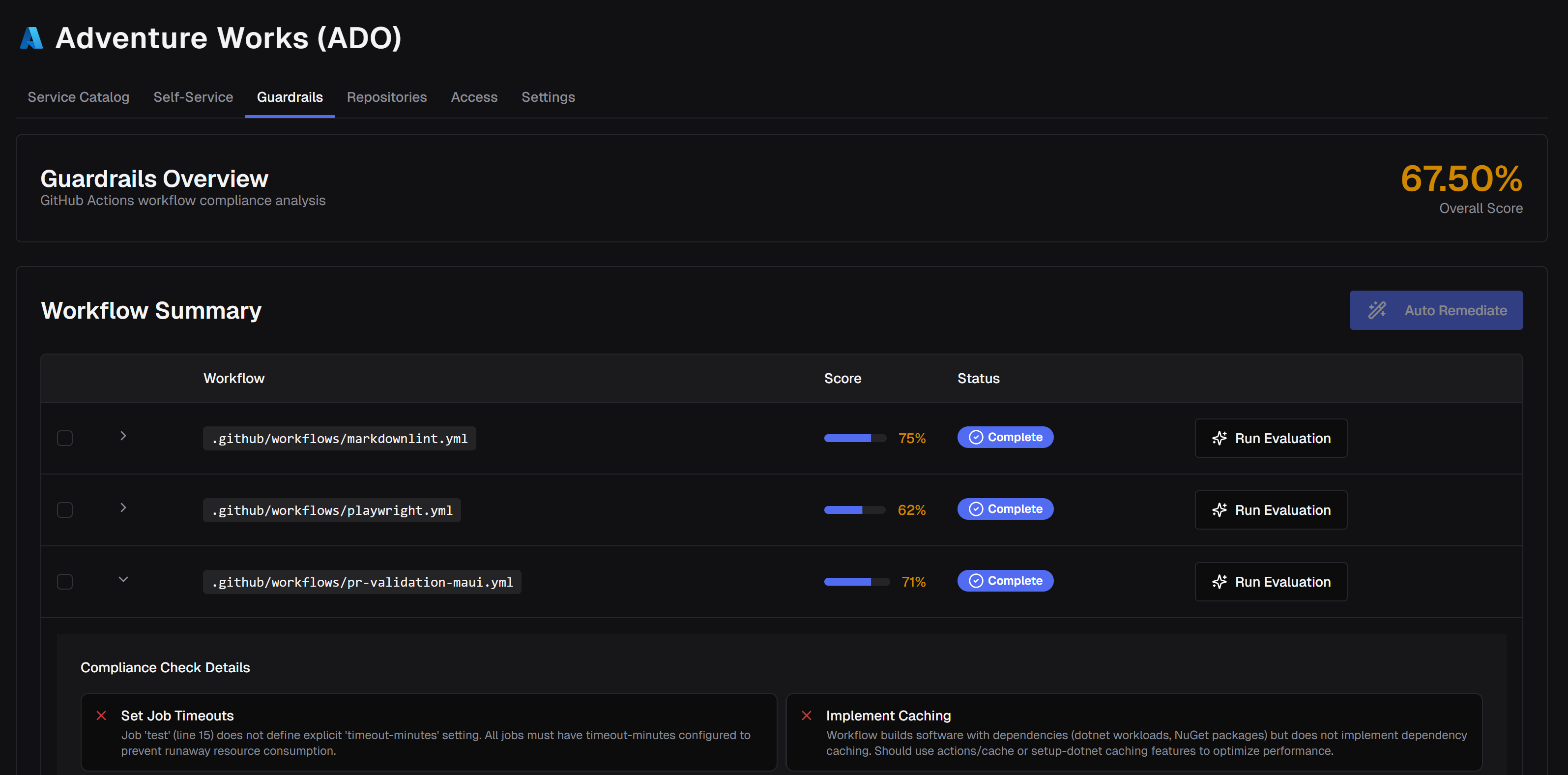
You can evaluate workflows on-demand from any compliance dashboard:
- Locate the workflow in the compliance table
- Click "Run Evaluation" next to the workflow
- The evaluation status will change to "Pending"
Monitoring Progress
Evaluations run automatically and update in real-time:
- Pending: Evaluation is queued and waiting to start
- Running: AI is actively analyzing your workflow
- Complete: Evaluation finished successfully
- Failed: An error occurred during evaluation
The dashboard automatically refreshes every 5 seconds while evaluations are in progress.
Remediating Failed Rules
From the Workflows tab, you can have CodeCargo open fixes for failing rules:
- Select one or more workflows that currently fail a rule
- Click Remediate N workflows
- Confirm the scope in the dialog
You can also remediate a single workflow from its row details. While a batch is in flight, Stop N cancels work that hasn't finished yet.
Understanding Your Results
Compliance Scores
Your compliance score is calculated as:
Score = (Passing Rules / Total Applicable Rules) × 100
Important Notes:
- Scores range from 0% to 100%
- Rules marked as "Not Applicable" or "Unknown" are excluded from the calculation
- Color coding helps you quickly identify issues:
- Green (≥80%): Good compliance
- Yellow (60-79%): Needs attention
- Red (<60%): Requires immediate action
Rule Evaluation Results
Each rule in your evaluation will have one of four results:
| Result | Icon | Meaning |
|---|---|---|
| Pass | ✓ Green checkmark | Your workflow meets the requirement |
| Fail | ✗ Red X | Your workflow doesn't meet the requirement |
| Not Applicable | - Gray dash | This rule doesn't apply to your workflow |
| Unknown | ? Gray question mark | The evaluation was inconclusive |
Understanding Failure Comments
When a rule fails, the AI provides a specific explanation of why. For example:
Rule: "Production deployments must have manual approval steps" Result: Fail Comment: "No approval gate found for production deployments. The workflow deploys directly to the 'prod' environment without requiring manual approval."
These comments help you understand exactly what needs to be fixed.
Secret Redaction in Comments
When compliance rules detect secrets or sensitive values in your workflows, the AI evaluator automatically redacts the actual values from comments to protect sensitive information. Instead of showing the literal secret values, comments reference secrets by their line number and type only.
For example, instead of showing the actual credentials, you'll see:
"Lines 38-39: The 'Run Playwright tests' step contains hardcoded credential values in the env block — specifically a hardcoded username value and a hardcoded password value. These sensitive values must be stored in GitHub Secrets and referenced via the secrets context rather than being hardcoded directly in the workflow file."
This approach ensures that compliance feedback remains helpful for remediation while keeping sensitive data secure in the evaluation process.
Security by Design
Secret redaction applies to all compliance evaluations, not just security-focused rules. The system automatically detects and protects API keys, passwords, tokens, account IDs, and other sensitive values across all rule categories.
Developers - Compliance Scores in Projects
Open Guardrails on your project for an Overview of posture plus Repositories and Workflows. If a workflow already has a score, it appears there; otherwise click Run Evaluation. Click a workflow to see which rules passed or failed, then fix them in the GenAI Editor or remediate from the Workflows tab.
Available on Team and Enterprise
Custom compliance rules and automated remediations require a Team or Enterprise plan. Built-in compliance rules are included on all plans. See pricing for details.